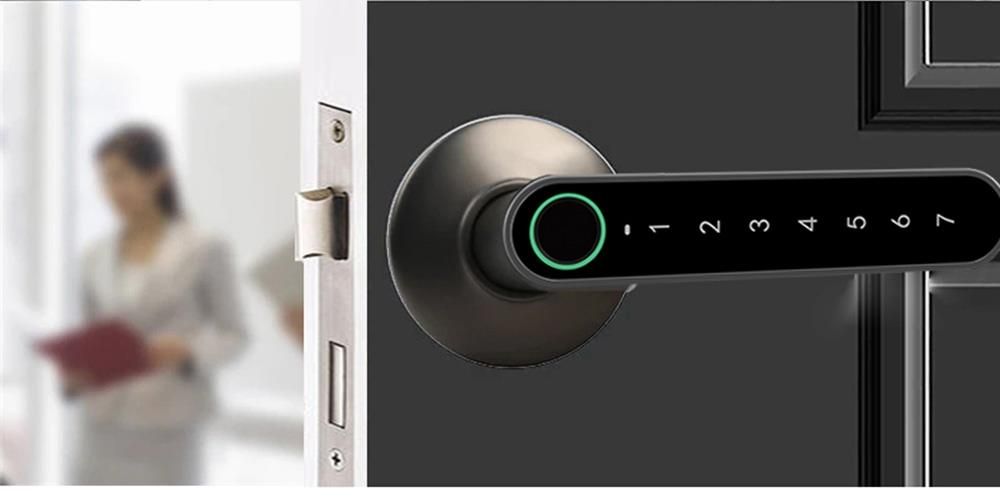
In today’s business environments — from offices and retail stores to warehouses and hospitality spaces — securing physical access is a core concern. Traditional mechanical locks remain in use, but electronic locks have become an increasingly common choice for businesses seeking flexible access control, auditability, and integration with modern security systems. Unlike simple key-and-cylinder locks, electronic locks can provide features such as keyless entry, remote monitoring, and configurable access levels.
What Are Commercial Electronic Locks?
Commercial electronic locks are locking devices that use electrical components to control access to doors rather than, or in addition to, traditional mechanical keys. They are typically connected to a power source and may be controlled by electronic credentials such as keycards, PIN codes, mobile apps, biometric data, or wireless signals. When a valid credential is presented, the lock’s mechanism is triggered electronically to unlock or grant access.
Depending on the system design, these locks can operate independently at a single door or integrate with centralized access control systems that manage permissions for multiple doors across a facility.
Benefits of Commercial Electronic Locks
Commercial electronic locks offer several practical benefits in business environments.
Flexible Access Control
Electronic systems allow administrators to grant or revoke access without rekeying locks. Permissions can often be updated centrally, which is useful in organizations with many users or high turnover.
Audit and Monitoring Capabilities
Many electronic locks record access events, including who accessed a door and when. This data supports security reviews and incident investigations.
Multiple Credential Options
Businesses can choose from PIN codes, RFID cards, proximity fobs, mobile credentials, or biometric identifiers based on their security and usability needs.
Keyless Convenience
Employees do not need physical keys, which can be lost, duplicated, or misplaced. Keyless entry can reduce costs and logistical challenges related to managing keys.
Integration with Security Systems
Electronic locks can be part of a broader security ecosystem, including alarms, CCTV cameras, and building automation systems.
Limitations and Considerations
While electronic locks provide many advantages, they also present some limitations.
Dependence on Power or Batteries
Electronic locks may rely on the building’s power supply or internal batteries. Power outages or depleted batteries can affect operation if not properly planned for.
Technical Complexity
These systems are more complex than mechanical locks, requiring installation planning and occasional technical support.
Cost Factors
Electronic locks and their installation can have higher upfront costs than simple mechanical locks. Ongoing maintenance and credential management may also add to long-term expenses.
Cybersecurity Considerations
Networked electronic lock systems must be configured and maintained with appropriate cybersecurity controls to reduce the risk of unauthorized access or hacking.
Types and Categories of Commercial Electronic Locks
Commercial electronic locks vary widely based on technology, credential type, and integration level.
Standalone Electronic Locks
These locks operate independently at a single door. They often use keypads, RFID cards, or mobile credentials and do not require a network connection.
Networked Access Control Locks
These locks are connected to a central access control system, allowing administrators to manage multiple doors from a unified interface. They may use wired or wireless communication protocols.
Smart Locks with Mobile Integration
These locks interact with mobile devices via Bluetooth, Wi-Fi, or other wireless standards, allowing users to unlock doors using smartphone apps or digital credentials.
Biometric Locks
Biometric locks use physiological traits such as fingerprints or facial recognition for access. They are commonly used in high-security settings.
Electric Strikes and Magnetic Locks
-
Electric strikes replace or augment the strike plate in a door frame and release when power is applied.
-
Magnetic locks use electromagnets to secure doors and release when energized or de-energized, depending on design.
Comparison Table: Common Electronic Lock Types
| Lock Type | Primary Credential | Integration Level | Typical Use |
|---|---|---|---|
| Standalone Keypad/RFID | PIN or card | Low | Single door, small offices |
| Networked Access Control | Card/mobile | High | Multi-door facilities |
| Smart Mobile Lock | Smartphone credential | Medium | Flexible workplaces |
| Biometric Lock | Fingerprint/face | High | High-security areas |
| Electric Strike | Electrical release | Medium | Retrofit doors |
| Magnetic Lock | Electromagnet | Medium | Secure entry points |
Latest Trends and Innovations in Commercial Electronic Locks
The field of electronic locks continues to evolve with technology trends and business needs:
Mobile and Cloud-Based Access
Systems increasingly support mobile credentialing and cloud-based management, allowing real-time updates and remote configuration.
Integration with Workplace Systems
Integration with HR systems, scheduling platforms, and visitor management systems can automate access based on role, location, or time.
Enhanced Biometric Solutions
Advances in fingerprint, facial, and even iris recognition aim to improve reliability, speed, and security.
Energy-Efficient Designs
Newer locks focus on low power consumption as part of sustainability goals and reduced battery maintenance.
Cybersecurity Enhancements
As more lock systems connect to networks, manufacturers emphasize encryption, secure firmware updates, and access logging to protect against digital threats.
Key Features to Consider When Evaluating Electronic Locks
When comparing commercial electronic locks, consider features that align with your business needs:
Credential Options
Determine whether PIN codes, keycards, mobile credentials, or biometrics are most suitable for your environment.
Integration Capabilities
Consider whether the lock needs to work with existing access control systems, HR databases, or security platforms.
Audit Trails
Choose solutions that provide detailed access logs if monitoring and compliance are important.
Power and Backup
Evaluate power requirements, battery life, and backup options to minimize disruption.
Security Standards
Review encryption methods, authentication protocols, and compliance with security standards.
Physical Fit
Ensure the lock type fits the existing door frame and hardware configuration.
Overview of Well-Known Electronic Lock Providers
Several companies are known for offering business-oriented electronic locks and access control solutions. Their official sites typically provide product specifications, whitepapers, and comparison resources.
-
Assa Abloy – Comprehensive access solutions including electronic locks
https://www.assaabloy.com -
Schlage (Allegion) – Electronic and smart lock options for commercial use
https://www.allegion.com -
Yale – Smart and networked locking technologies
https://www.yalehome.com -
HID Global – Access control systems and credentials
https://www.hidglobal.com -
Salto Systems – Networked access control and smart locking solutions
https://www.saltosystems.com
This list is provided for informational context and is not an endorsement.
How to Choose the Right Electronic Lock for Your Business
Choosing an electronic lock involves balancing security, convenience, and budget.
Define Access Needs
Consider who needs access, at what times, and for which areas. Different doors may require different security levels.
Assess Integration Requirements
If you have an existing security or facility management system, select locks that integrate smoothly.
Evaluate Credential Preferences
Decide whether employees will use cards, mobile apps, PINs, or biometrics based on convenience and comfort.
Consider Scalability
If your business is growing, choose solutions that can scale to additional doors or locations.
Review Security Features
Prioritize products that use strong encryption, offer detailed audit trails, and support secure credential management.
Plan for Maintenance
Understand battery life, warranty coverage, firmware updates, and support availability.
Checklist for Comparing Electronic Locks
-
Credential type needed
-
Integration with existing systems
-
Audit logging capability
-
Power and backup options
-
Security standards and encryption
-
Installation and maintenance requirements
-
Cost and scalability
Tips for Best Use and Maintenance
Daily Use Tips
-
Regularly update access permissions as personnel change
-
Keep credential management organized to avoid confusion
Maintenance Tips
-
Replace batteries according to manufacturer recommendations
-
Check lock operation periodically for signs of wear
-
Update firmware to maintain security patches
Long-Term Considerations
-
Keep spare components or batteries in stock
-
Document configuration settings and changes
-
Train staff on lock operation and basic troubleshooting
Frequently Asked Questions
Are electronic locks secure for business use?
Yes, when selected and configured appropriately, electronic locks can be secure, especially when they use encryption and proper access controls. However, cybersecurity best practices should be followed.
Do electronic locks work during power outages?
Many commercial locks have battery backup or fail-safe configurations that allow operation during power interruptions. It is important to understand the specific model’s behavior.
Can electronic locks be retrofitted on existing doors?
Some electronic locks and electric strike options are designed for retrofit installation, but compatibility with the door and frame should be verified.
Are biometric locks better than card or PIN systems?
Biometric systems offer strong authentication but may introduce complexity or privacy considerations. A mix of credentials is sometimes used for balance.
How often should electronic locks be maintained?
Periodic checks — such as quarterly or semi-annual inspections — are recommended depending on usage volume and environmental conditions.
Conclusion: Practical Insights for Business Access Control
Commercial electronic locks provide a flexible and modern alternative to traditional mechanical locks. They support keyless entry, centralized access control, and audit tracking, which can enhance security and administrative ease across business environments.
Understanding the types of electronic locks, how they operate, and the key features that matter for your context helps you select solutions that align with your organization’s needs. Thoughtful planning, regular maintenance, and awareness of emerging trends help ensure that electronic locks not only secure your business spaces effectively but also adapt to evolving operational requirements